
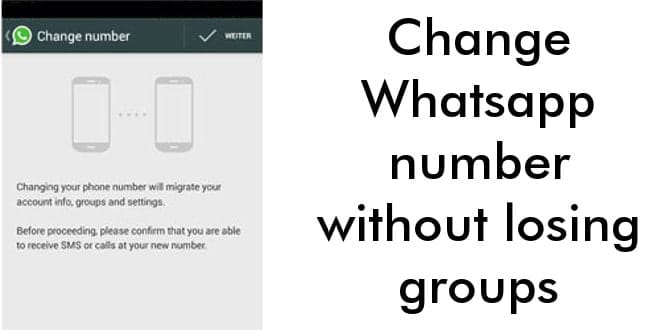
Change Whatsapp number without losing groups, learn how to change the number in Whatsapp without losing any conversations, groups and contacts.
By changing the whatsapp number this way, this number is updated in the whatsapp contacts list of all people have it added.
This eliminates one of the biggest problems when changing the number, which is having to send the new number to all contacts.
Change Whatsapp Number
Let’s take a step-by-step look at how to change the phone number in whatsapp
Step 1 : Insert the new chip with the new number
Step 2 : Open the whatsapp application (still with the old number connected)
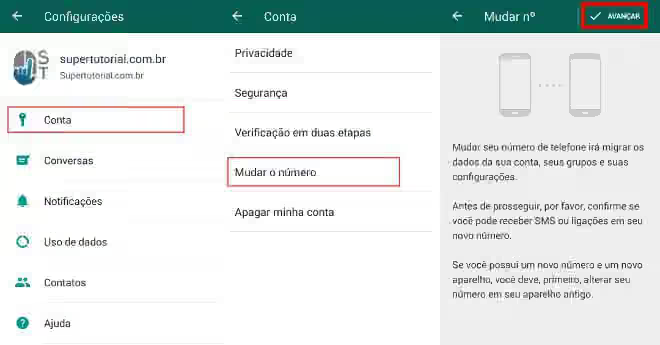
Step 3 : Open Settings> Account> Change number> next.
Step 4 : Put the old number in the upper space, (+XX XX XXXXX-XXXX) country code +1 for USA (or your contry code) followed by the Number.
In the lower space enter the new number respecting the same rules, contry code + Number.
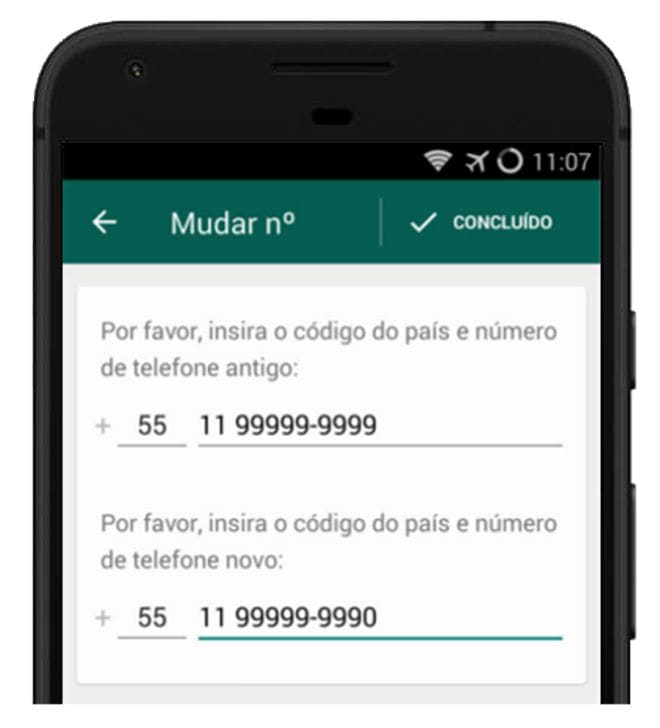
An option called “Done” will appear, then click on it (Verification will occur per call or SMS itself) and your confirmation will be fully updated
Advantages and disadvantages of updating the number
The user is not required to update the number when CHIP exchange, he can simply create a new whatsapp with the new number and use.
Let’s look at the advantages and disadvantages of change whatsapp number.
Advantages
- You will not miss any conversations.
- You will not lose any group
- No need to keep spreading the new number
- Your contacts do not need to add the new number
- The new number will be updated in the contact list of everyone who has it saved
- The process is simple and fast
- It does not leave a number of whatsapp “abandoned” that can be revived later by the person who bought the chip with the number
Disadvantages
- If you have changed numbers to avoid some contact, it will not work (it will know the new number).
- If you want to leave a group (without anyone noticing) you must delete the old whatsapp and do not update
Bonus
Learn to put two whatsapp in one smartphone.